
Real-time applications with Socket.io

Socket.io is a JavaScript library that enables real-time, two-way communication between clients and servers in web applications. It builds on the WebSocket protocol and adds an abstraction layer that makes real-time applications easier to build. Here is an overview of how to use Socket.io in a Node.js environment:
1. Install Socket.io:
Install the socket.io package using npm:

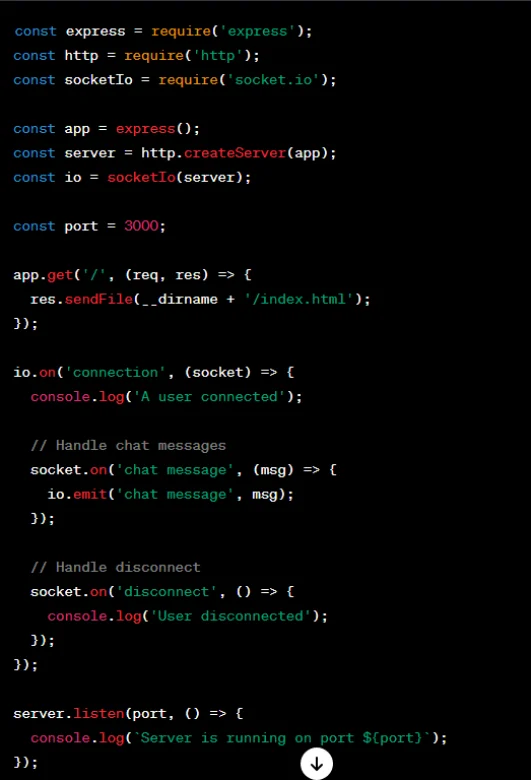
2. Set Up the Server:
Create a basic Node.js server with Express and add Socket.io.
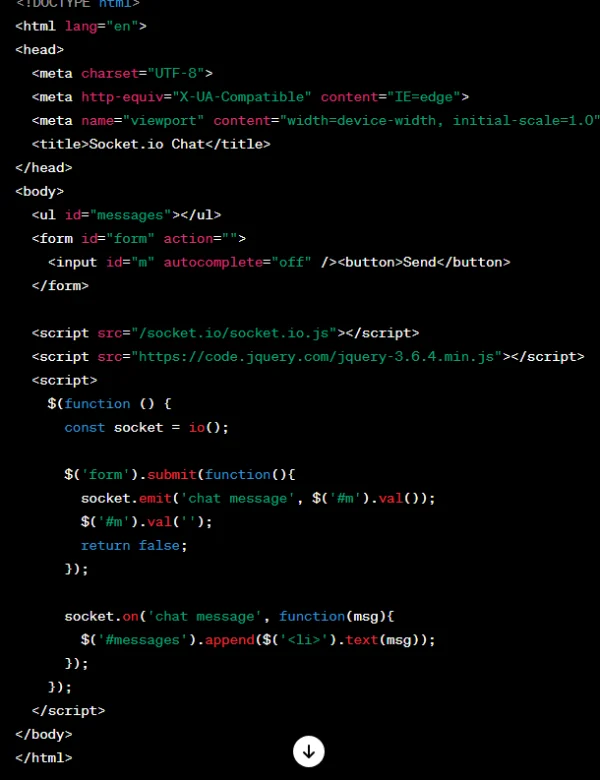
3. Set Up the Client:
Create a simple HTML file as the client interface and include the Socket.io client library.
4. Run Your Application:
Run your Node.js server:

Visit http://localhost:3000 in your browser and open multiple tabs. You should see chat messages appear in real time across the tabs.
Key Concepts and Tips:
-
Events: Socket.io uses events to communicate between server and clients. In the example above, “connection”, “chat message” and “disconnect” are events.
-
Broadcasting:
io.emit()is used to broadcast messages to all connected clients. You can also usesocket.broadcast.emit()to send a message to everyone except one socket. -
Rooms: Socket.io lets you organise clients into rooms for targeted communication.
-
Middleware: You can use middleware with Socket.io to inspect or modify data as it is sent or received.
-
Error Handling: Add proper error handling to keep a real-time application reliable.
Socket.io suits many real-time applications, such as chat, live updates and collaborative tools. The official Socket.io documentation has in-depth information and examples of advanced features.
